Reverse Engineering the MUT-III SE: Part 3 - Building a Web-Based CommonDB Viewer
This is the third part of the MUT-III SE reverse engineering series. Part 1
covered decrypting .exdf files, and Part 2
explored the CommonDB structure. This post discusses the development of the MUT-III SE CommonDB Explorer
—a web-based tool that makes the database accessible without requiring programming knowledge.
Making Reverse Engineering More Accessible
The Python scripts from earlier parts work well but require technical know-how—installing Python, using the command line, modifying and running the code. This creates barriers for mechanics, enthusiasts, and researchers who want to explore the CommonDB.
A browser-based tool removes these barriers
- No installation — Works in any modern browser, including on shared or public computers
- Visual interface — Tables, search boxes, and filters instead of command-line arguments
- Interactive exploration — Sort, filter, and browse data in a visual interface
- Cross-platform — Functions identically across platforms and operating systems
Design Philosophy: Local-First Architecture
Traditional web applications process data on servers—a user uploads a file, the server processes it, and returns results. This model would be difficult to implement here for various reasons, such as:
- Database Ownership — CommonDB files are part of Mitsubishi’s MUT-III SE diagnostic software. Hosting them on a server raises legal and ethical concerns.
- Privacy — VINs & other search terms, while generally public, are something I would prefer not to collect.
- Cost — Maintaining a backend for processing file uploads would be an ongoing expense.
The solution: never upload the data. The CommonDB Explorer uses a local-first architecture where all processing happens in the browser. The website provides the code; the user’s machine provides the data and compute.
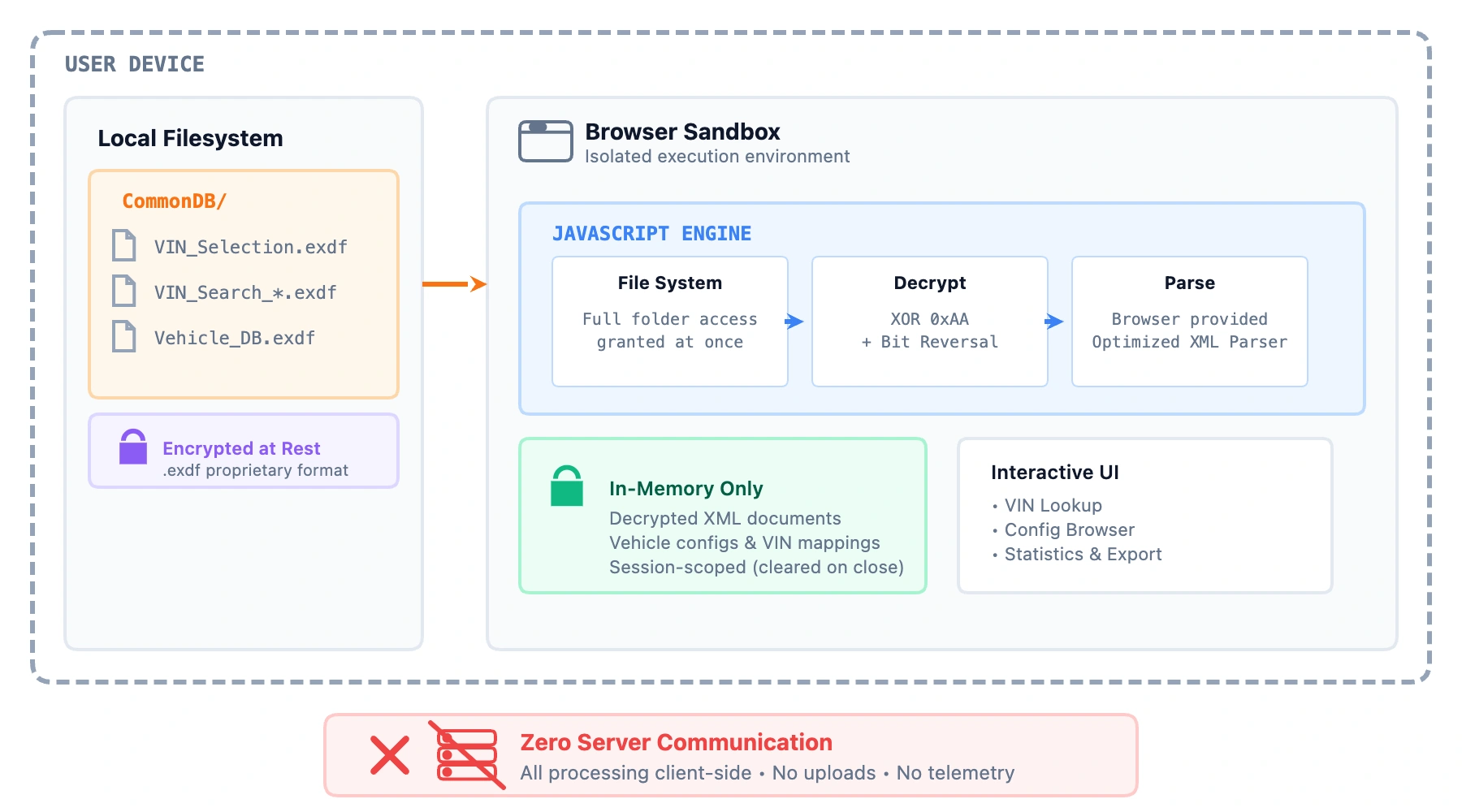
This architecture is possible through the File System Access API , a modern browser feature that allows web pages to read local files with explicit user permission.
When the “Select Folder” button is clicked, the browser displays a system folder picker:
const dirHandle = await window.showDirectoryPicker();
The File System Access API provides a directory handle for enumerating and reading files within the selected folder. The user must explicitly grant permission—the website cannot silently access arbitrary data. Once granted, files are read, decrypted, and parsed entirely within the browser.
Security Model
Running code in a browser differs fundamentally from running native applications. Browsers implement a security sandbox that restricts JavaScript capabilities:
- No arbitrary filesystem access — Code cannot read system files without explicit permission
- Origin isolation — Code from one website cannot access data from another
- No persistent access — File permissions are revoked when the browser closes
- Read-only operation — The CommonDB Explorer reads files but cannot modify them
Compared to downloading and running arbitrary Python, which can have full filesystem access, make arbitrary network connections, and persist on the user’s computer indefinitely, the browser sandbox provides security assurances that do not depend on trusting the developer.
Tool Capabilities
The CommonDB Explorer enables several types of data visualization and access patterns.
VIN Decoding
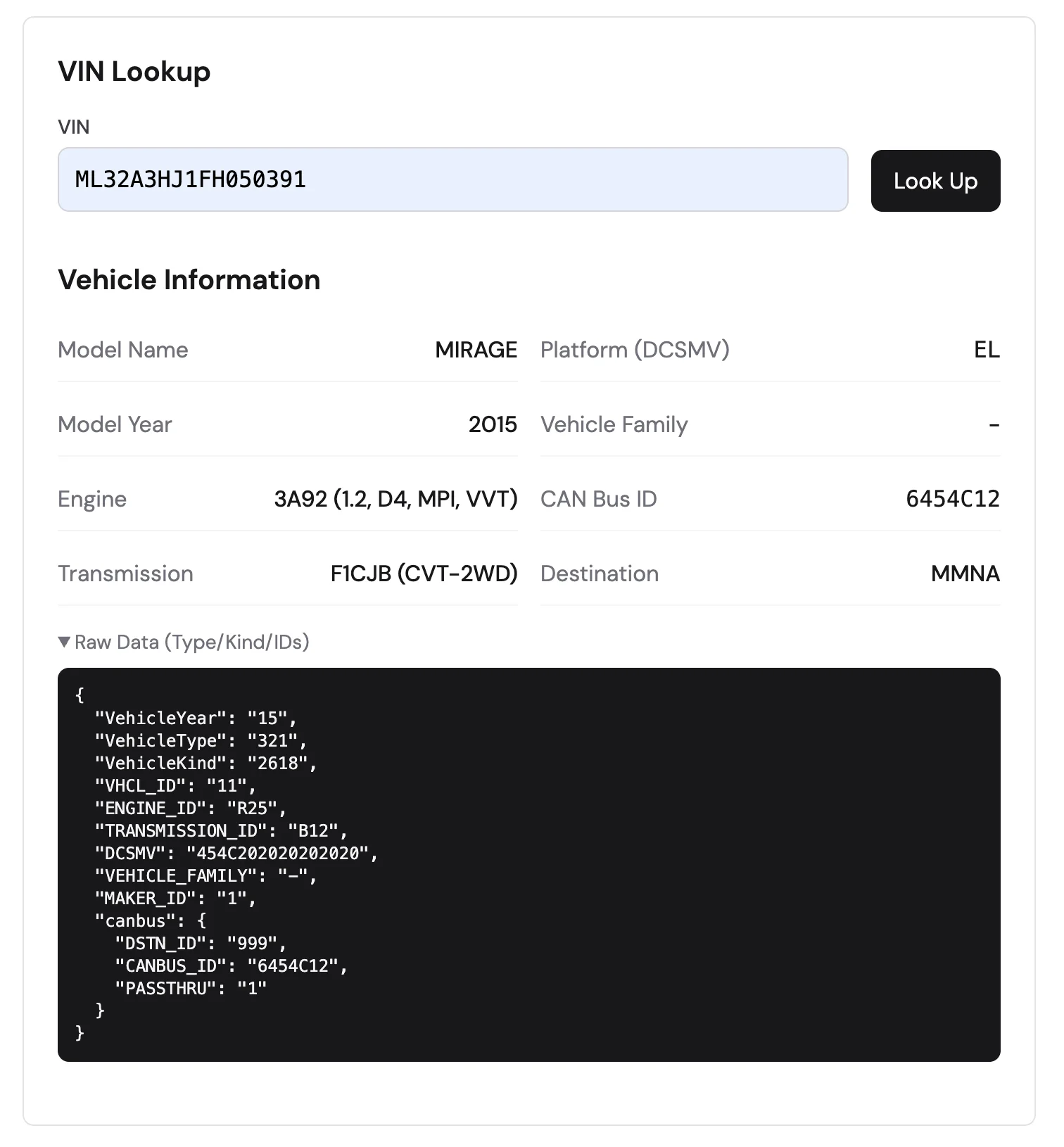
Given a 17-character VIN, the tool retrieves the complete vehicle specification: model name, model year, engine type, transmission, platform code, and CAN bus identifier. This information is useful for parts lookup, compatibility verification, and understanding vehicle configurations.
Aggregate Analytics
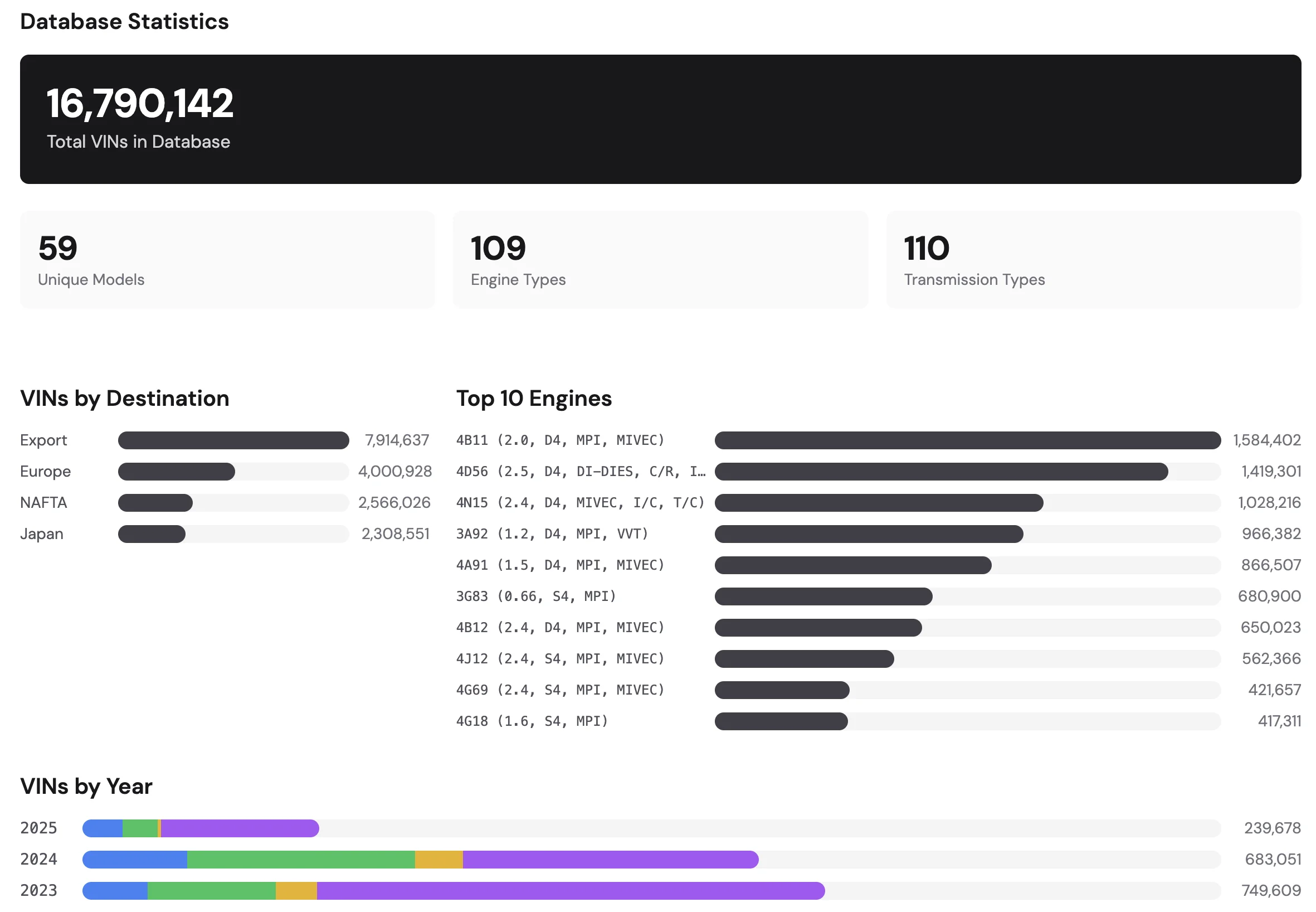
The tool generates aggregate analytics by processing all VINs in the database. This includes:
- Total number of VINs in the database
- Distribution by destination market (North America, Europe, Asia, etc.)
- Engine and transmission popularity across models
- Year-over-year production breakdowns
These statistics provide insight into production volumes and regional market preferences.
Market Name Comparison
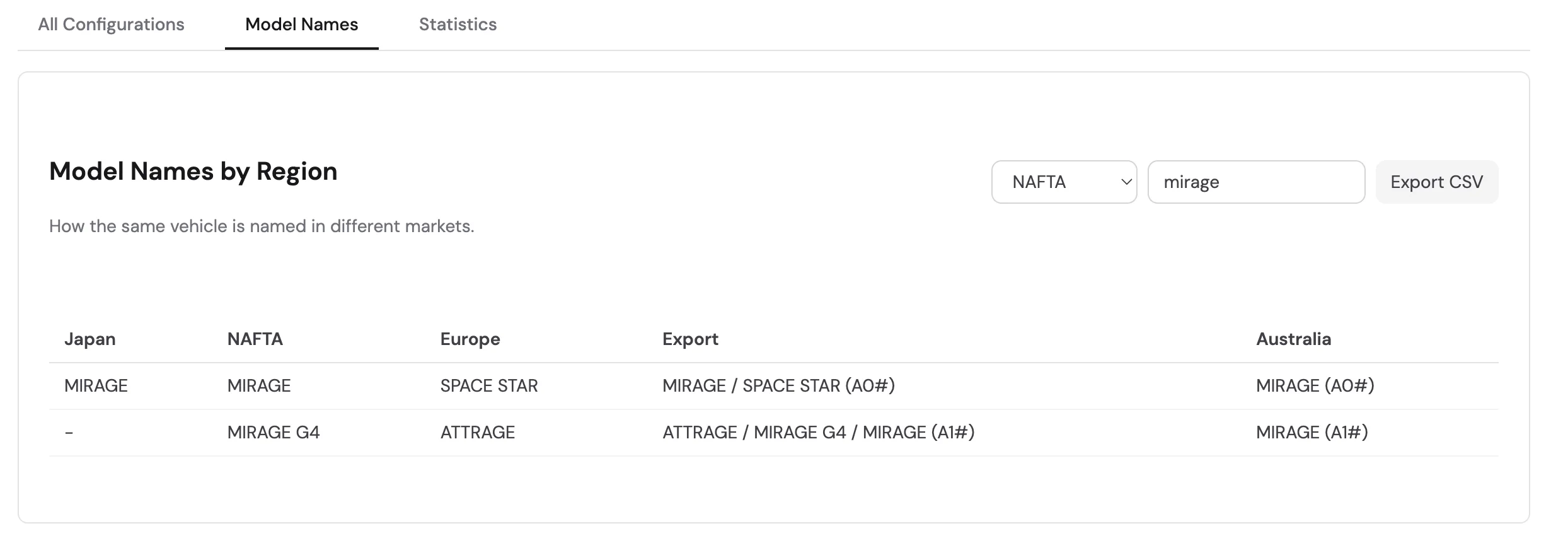
The same vehicle model is often sold under different names in different regions. For example, the “Mirage” in North America corresponds to the “Space Star” in Europe. This cross-reference is valuable for sourcing parts internationally, understanding global product strategy, and identifying interchangeable parts across markets.
Component Cross-Reference
The tool allows filtering by engine code or transmission type to find all vehicles sharing that component. This data can be used to identify cross model part interchangeability.
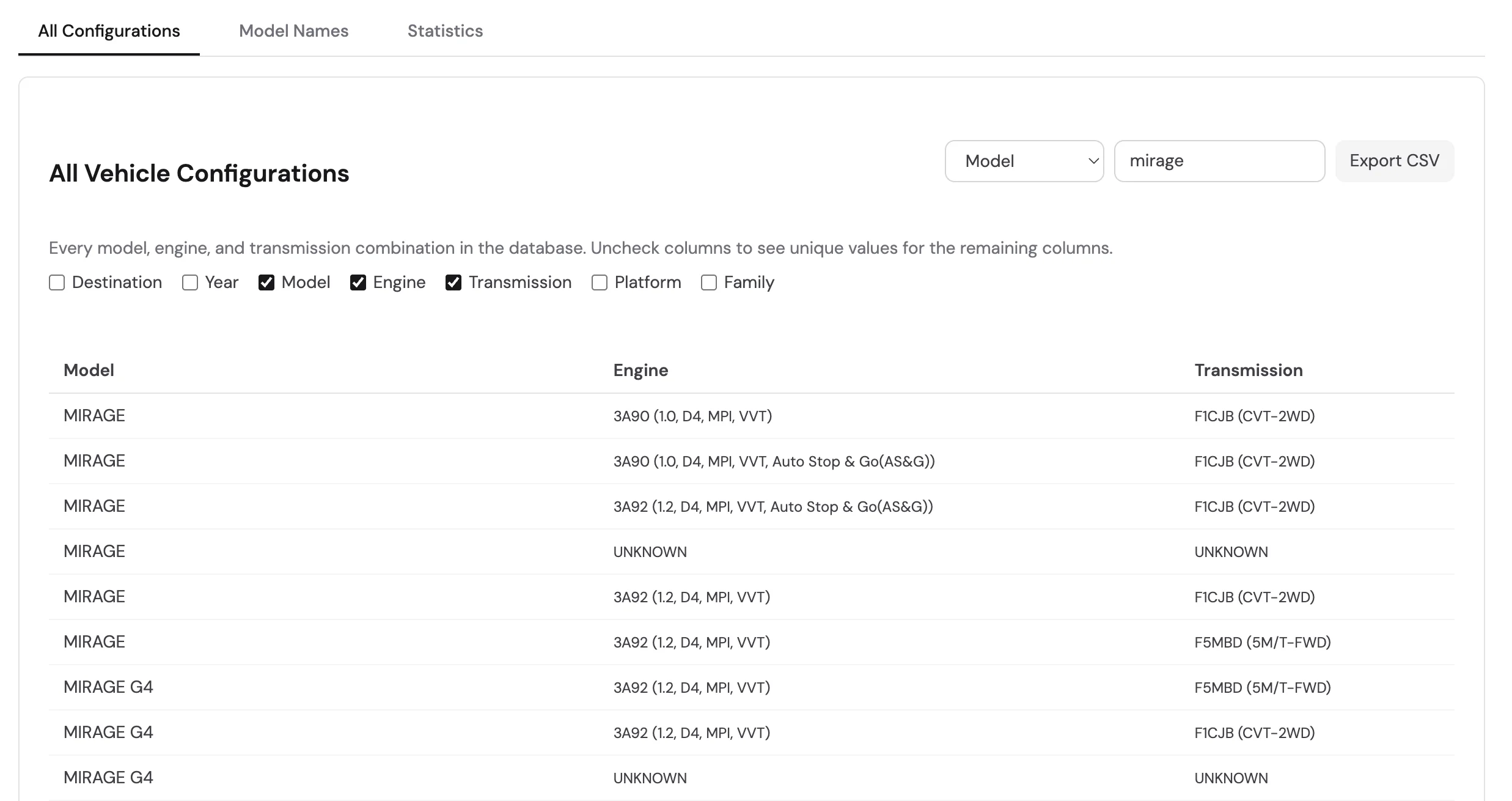
CSV Export
Filtered data can be exported, enabling further processing in spreadsheet applications or statistical tools.
Browser Compatibility
The File System Access API is supported in Chromium-based browsers (Chrome, Edge, Opera) but not in Firefox or Safari. Users on unsupported browsers see a warning with a link to the Python scripts on GitHub , which provides data access functions.
Conclusion
The CommonDB Explorer demonstrates that powerful reverse engineering tools can run directly in the browser without compromising user privacy, thanks to a local-first architecture. Try the CommonDB Explorer or review the Python source code to understand the CommonDB structure.
The next part of this series will explore the DiagDB—the database, specifically the configuration options stored within.