Reverse Engineering the MUT-III SE: Part 2 - Exploring the CommonDB
This is the second part of the MUT-III SE reverse engineering series. In Part 1
, we decrypted the proprietary .exdf files that make up the local database. In this part we explore the CommonDB—the database made up of exdf files that maps VINs to high-level vehicle data.
Prerequisites
This tutorial builds on the work done in the previous part and assumes the reader has downloaded and decrypted the MUT-III SE .exdf database files as covered in Part 1
.
A Note on VIN Structure
VINs (Vehicle Identification Numbers) are 17-character vehicle identifiers. Each character position has a standardized meaning.
| Position | Meaning |
|---|---|
| 1-3 | World Manufacturer Identifier (WMI) |
| 4-8 | Vehicle Descriptor Section (VDS) |
| 9 | Check Digit |
| 10 | Model Year |
| 11 | Plant Code |
| 12-17 | Sequential Production Number |
The first character(s) of the WMI indicate the region where the manufacturer is located—in practice, each country is assigned a unique WMI. For example, ML–MR indicates Thailand.
The NHTSA offers a free, no-registration-required VIN Decoder .
The sequential nature of the production numbers means VINs from the same production run will be numerically adjacent.
What is the CommonDB?
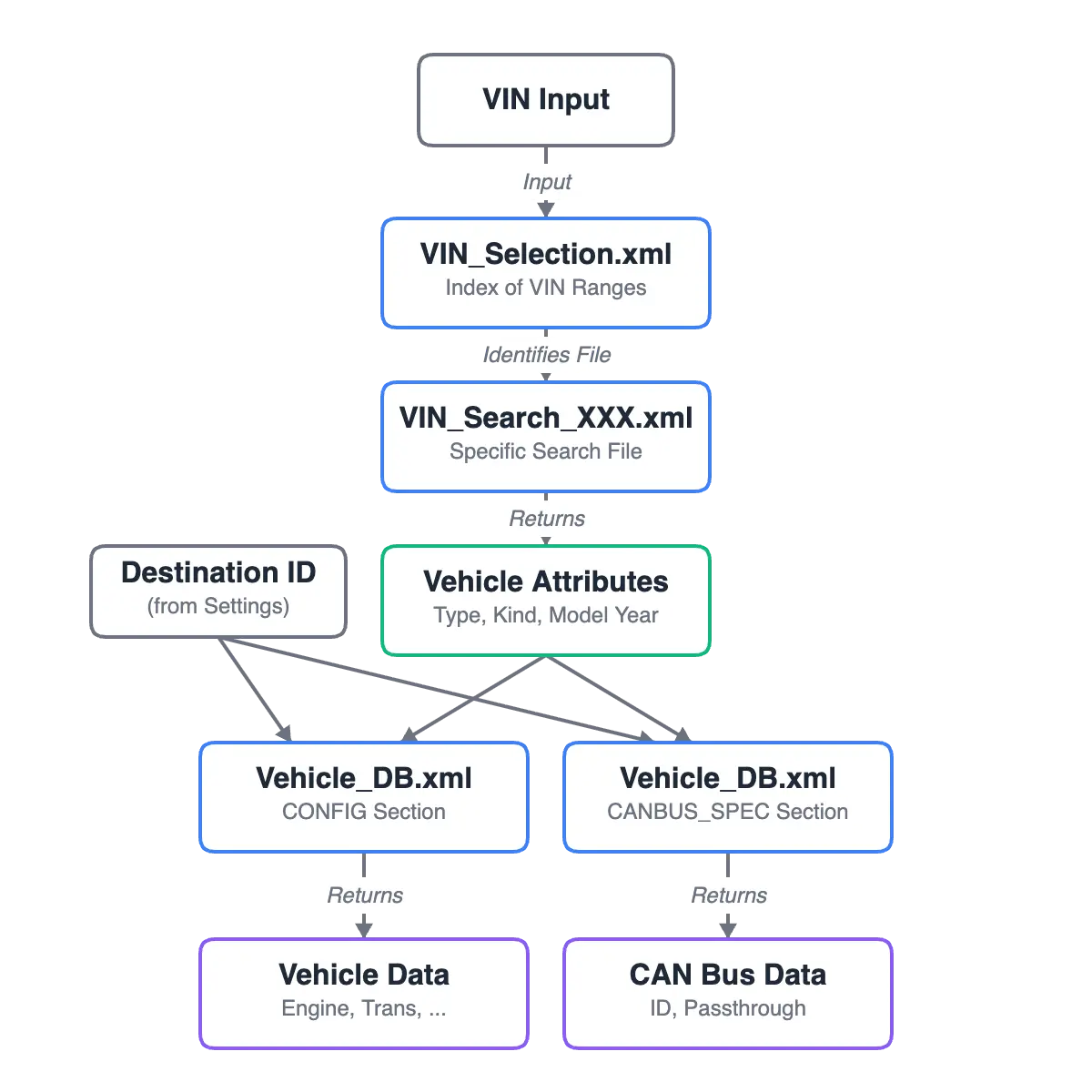
The CommonDB is a collection of XML files that map VINs to high-level vehicle data. When a technician connects the MUT-III SE to a vehicle, the VIN is automatically retrieved, and the software uses these files to identify the vehicle’s type, model year, engine configuration, and other specifications.
The key files in the CommonDB directory are:
VIN_Selection.xml— Index file mapping VIN ranges to VIN_Search filesVIN_Search_XXX.xml— Individual VIN to vehicle type/kind/year mappingVehicle_DB.xml— Vehicle specifications, CAN bus configurations, and master data
Additionally, the following System files are relevant:
System/Setting.xml— User configured default settingsSystem/DEST_DB.xml— Destination definitions
VIN_Selection.xml
This file serves as an index, mapping VIN ranges to specific VIN_Search_XXX.exdf files.
The index references .exdf files (the encrypted format). Since we decrypted these files to .xml, we will replace the extension during lookup.
<VIN_Selection>
  <ALL>
    <FILE NO="1">
      <VIN_FROM>4A31K2DF0AE001157</VIN_FROM>
      <VIN_TO>4A32B2FFXCE009125</VIN_TO>
      <NAME>VIN_Search_000.exdf</NAME>
    </FILE>
    <FILE NO="2">
      <VIN_FROM>4A32B2FFXCE009139</VIN_FROM>
      <VIN_TO>4A3AB36F09E001061</VIN_TO>
      <NAME>VIN_Search_001.exdf</NAME>
    </FILE>
<!-- Truncated for blog post -->
This architecture offers several advantages:
- Faster lookups — Lookup using ranges via string comparison instead of trying to match across all possible VINs.
- Smaller files — Each
VIN_Search_XXX.exdffile is manageable in size - Easier updates — Individual files can be replaced with newer versions
- Reduced decryption overhead — We only need to decrypt a subset of the available files
The following is a Python script that identifies the VIN_Search_XXX.xml file to read given a VIN and path to the CommonDB.
import os
import xml.etree.ElementTree as ET

def find_vin_search_file(vin: str, commonDB_path: str) -> str:
    """
    Identifies the correct VIN_Search_XXX.xml file for the given VIN using VIN_Selection.xml
    Args:
        vin: The VIN to search for
        commonDB_path: The path to the CommonDB directory
    Returns:
        The path to the VIN_Search_XXX.xml file
    """

    selection_file = os.path.join(commonDB_path, "VIN_Selection.xml")

    for file_elem in ET.parse(selection_file).find("ALL").findall("FILE"):
        vin_from = file_elem.find("VIN_FROM").text
        vin_to = file_elem.find("VIN_TO").text
        if vin_from <= vin <= vin_to:
            # swap extension from .exdf to .xml
            return file_elem.find("NAME").text.replace(".exdf", ".xml")

if __name__ == "__main__":
    vin = "ML32A3HJ1FH050391"
    commonDB_path = "/MUT3_SE/CommonDB"
    print(find_vin_search_file(vin, commonDB_path))
Example output
VIN_Search_294.xml
VIN_Search_XXX.xml
These files contain the VIN-to-vehicle mappings. Each file maps thousands of VINs to their corresponding vehicle Type, Kind, and Model Year.
<VIN_Search>
  <VI VN="MMCJJKL60NH021589">
    <TY>439</TY>
    <KD>2829</KD>
    <MY>22</MY>
  </VI>
  <VI VN="MMCJJKL60NH021590">
    <TY>439</TY>
    <KD>2829</KD>
    <MY>22</MY>
  </VI>
<!-- Truncated for blog post -->
Most VIN_Search_XXX.xml files are approximately 2.8-3.2MB in size, containing around 181,612 lines. However, the most recent files are under 1MB.
Interestingly, in the specific version of the MUT-III SE I am looking at, VIN_Search_463.xml is the file with the highest file number and only contains partial VINs such as ML32A3HJEH.
I determined what the XML element names (TY, KD, MY) represent based on the following decompiled source code.
System/Common/MutEngine/MutEngine.decompiled.cs:
public ModelVehicleInfo MutEngineDBGetIniFile() {
    return new ModelVehicleInfo {
        VehicleYear = MutEngineFileAccess.GetIniXmlValue("Vehicle", "MY"),
        VehicleType = MutEngineFileAccess.GetIniXmlValue("Vehicle", "TYPE"),
        VehicleKind = MutEngineFileAccess.GetIniXmlValue("Vehicle", "KIND")
    };
}
The following is a Python function that takes the VIN, relevant vin_search file name, and commonDB path and returns the Model Year, Type, and Kind of the vehicle.
def lookup_vin(vin: str, search_file_name: str, commonDB_path: str) -> dict:
    """
    Looks up the VIN in the appropriate VIN_Search_XXX.xml file
    Args:
        vin: The VIN to search for
        search_file_name: The name of the VIN_Search_XXX.xml file
        commonDB_path: The path to the CommonDB directory
    Returns:
        A dictionary containing the VIN information
    """
    search_file = os.path.join(commonDB_path, search_file_name)

    for vi_elem in ET.parse(search_file).findall("VI"):
        if vi_elem.get("VN") == vin:
            return {
                "VehicleYear": vi_elem.find("MY").text,
                "VehicleType": vi_elem.find("TY").text,
                "VehicleKind": vi_elem.find("KD").text,
            }

if __name__ == "__main__":
    vin = "ML32A3HJ1FH050391"
    commonDB_path = "MUT3_SE/CommonDB"
    search_file_name = find_vin_search_file(vin, commonDB_path)
    print(lookup_vin(vin, search_file_name, commonDB_path))
Example output
{'VehicleYear': '15', 'VehicleType': '321', 'VehicleKind': '2618'}
The dictionary keys are arbitrary; I chose to match the variable names from the decompiled source code.
Understanding Destinations
Before we can retrieve vehicle data from Vehicle_DB.xml, we need to understand what a destination is. Destinations represent markets (Japan, North America, Europe, etc.) and affect which vehicle configurations are available.
Temp/Vehicle.xml
<?xml version="1.0" encoding="utf-8"?>
<VEHICLE_DEFINE>
  <DESTIN>003</DESTIN>
  <VIN></VIN>
  <CANBUSID></CANBUSID>
  <MAKER>1</MAKER>
  <TYPE></TYPE>
  <KIND></KIND>
  <MY></MY>
  <ENGINE></ENGINE>
  <TRANSM></TRANSM>
  <SYASYUMEI></SYASYUMEI>
  <VCOMPID></VCOMPID>
  <VHCL_SCRT>0</VHCL_SCRT>
  <DCSMV></DCSMV>
  <VIN_ST>0</VIN_ST>
</VEHICLE_DEFINE>
The DESTIN is the vehicle’s intended destination; it limits certain functions. For example, the following code has an early return that disables the feature if the DESTIN is not 002 (North America).
System/Common/MutRpg2/MutRpg2.decompiled.cs
public void GetReproVin(out string vin) {
    uint protocolId = 132353u;
    byte[] CarInfoSupport = null;
    bool flag = false;
    vin = "";
    if (mutEngineDataAccess_0 == null) {
        mutEngineDataAccess_0 = new MutEngineDataAccess();
    }
    if (mutCommunicationAccess_0 == null) {
        ModelDeviceInfo deviceInfo = MutEngineFileAccess.MutEngineGetDevice();
        mutCommunicationAccess_0 = new MutCommunicationAccess(deviceInfo);
    }
    if (mutCommunicationAccess_0.GetVinProgramFlow(out vin) == -2) {
        flag = true;
    }
    mutCommunicationAccess_0.ExitMutVCICommunication(0, initVin: true);
    if (!flag || !MutEngineFileAccess.GetIniXmlValue("Vehicle", "DESTIN").Equals("002")) {
        return;
    }
    if (mutCommunicationAccess_0.InitMutVCICommunication(protocolId.ToString("X", provider), "") == 0) {
        mutCommunicationAccess_0.m_MutCommunication.MutCommSetParameter(protocolId, 33554435u, "0");
        if (mutCommunicationAccess_0.GetOBDMode09Info(out CarInfoSupport) == 0 && GetCarInfoSupport(1, CarInfoSupport) && GetCarInfoSupport(2, CarInfoSupport)) {
            mutCommunicationAccess_0.GetCarInfoData(2, out vin);
        }
    }
    mutCommunicationAccess_0.ExitMutVCICommunication(0);
}
System/DEST_DB.xml
This file defines all available destinations. Looking at the decompiled code in System/Common/MUT3_SE/MUT3_SE.decompiled.cs, we can see how destinations are loaded:
private List<ModelDestination> DestinationList()
{
    new List<ModelDestination>();
    return (from lstDest in Extensions.Elements<XElement>(Extensions.Elements<XElement>(((XContainer)XDocument.Load("../../../MUT3_SE/System/DEST_DB.xml")).Elements(XName.op_Implicit("DEST_DEFINE")), XName.op_Implicit("SORT")), XName.op_Implicit("NAME"))
      orderby (int)((XObject)lstDest).Parent.Attribute(XName.op_Implicit("No"))
      select ModelDestination.Create((string)((XContainer)lstDest).Element(XName.op_Implicit("E")), (string)((XContainer)((XObject)lstDest).Parent).Element(XName.op_Implicit("DESTID")), (string)((XContainer)((XObject)lstDest).Parent).Element(XName.op_Implicit("UNIT")), (string)((XContainer)((XObject)lstDest).Parent).Element(XName.op_Implicit("ALL_DTC_LOG")), (string)((XContainer)((XObject)lstDest).Parent).Element(XName.op_Implicit("DESTIN")))).ToList();
}
The DEST_DB.xml file includes localized names for each destination:
<?xml version="1.0" encoding="UTF-8" standalone="yes"?>
<DEST_DEFINE>
  <INFO>
    <VERSION>01.00.00</VERSION>
    <COMMENT>5 destinations+</COMMENT>
  </INFO>
  <SORT No="1">
    <DESTID>001</DESTID>
    <DESTIN>001</DESTIN>
    <UNIT>1</UNIT>
    <ALL_DTC_LOG>1</ALL_DTC_LOG>
    <NAME>
      <C>JAPAN</C>
      <E>JAPAN</E>
      <F>JAPAN</F>
      <G>JAPAN</G>
      <H>JAPAN</H>
      <I>JAPAN</I>
      <J>JAPAN</J>
      <K>JAPAN</K>
      <L>JAPAN</L>
      <N>JAPAN</N>
      <R>JAPAN</R>
      <S>JAPAN</S>
      <T>JAPAN</T>
      <V>JAPAN</V>
      <W>JAPAN</W>
      <Y>JAPAN</Y>
    </NAME>
  </SORT>
  <SORT No="2">
    <DESTID>002</DESTID>
    <DESTIN>002</DESTIN>
    <UNIT>0</UNIT>
    <ALL_DTC_LOG>1</ALL_DTC_LOG>
    <NAME>
      <C>NAFTA</C>
<!-- Truncated for blog post -->
As discussed in Part 1, the NAME element uses language codes for localization—E is for English.
Based on manual static code analysis, DESTID appears to be a display or sort order ID (e.g. 002 for NAFTA), while DESTIN is the internal destination code used in Vehicle_DB.xml lookups.
We will be using destination 002 NAFTA (North American Free Trade Agreement) as I am in Canada.
Vehicle_DB.xml
This is the main vehicle database containing multiple sections:
<Vehicle_DB>
  <INFO>
    <VERSION>1.0.3</VERSION>
    <COMMENT>from PRG2103</COMMENT>
  </INFO>
  <CONFIG><!-- Truncated for blog post --></CONFIG>
  <CANBUS_SPEC><!-- Truncated for blog post --></CANBUS_SPEC>
  <CONFIG_ENGINE><!-- Truncated for blog post --></CONFIG_ENGINE>
  <CONFIG_TRANSMISSION><!-- Truncated for blog post --></CONFIG_TRANSMISSION>
  <MST_VHCL><!-- Truncated for blog post --></MST_VHCL>
  <MST_DSTN><!-- Truncated for blog post --></MST_DSTN>
  <MST_MAKER><!-- Truncated for blog post --></MST_MAKER>
</Vehicle_DB>
CONFIG Section
This section contains destination-specific vehicle configuration. The structure is organized by destination ID:
<CONFIG>
  <ID DSTN_ID="001">
    <VHCL TYPE="-123" KIND="-171" MODEL_YR="4">
      <VHCL_ID>30</VHCL_ID>
      <ENGINE_ID>999</ENGINE_ID>
      <TRANSMISSION_ID>999</TRANSMISSION_ID>
      <VHCL_VIEW>0</VHCL_VIEW>
      <MAKER_ID>1</MAKER_ID>
      <DCSMV>4E505A2020202020</DCSMV>
      <VEHICLE_FAMILY>-</VEHICLE_FAMILY>
    </VHCL>
    <VHCL TYPE="-123" KIND="884" MODEL_YR="3">
      <VHCL_ID>30</VHCL_ID>
      <ENGINE_ID>999</ENGINE_ID>
      <TRANSMISSION_ID>999</TRANSMISSION_ID>
      <VHCL_VIEW>0</VHCL_VIEW>
      <MAKER_ID>1</MAKER_ID>
      <DCSMV>4E505A2020202020</DCSMV>
      <VEHICLE_FAMILY>-</VEHICLE_FAMILY>
    </VHCL>
<!-- Truncated for blog post -->
The destination is a global setting configured by the user in the MUT-III software. This setting could be used to improve lookup performance by reducing the number of configurations the software must search through.
We can manually traverse to the CONFIG->ID block for DESTN_ID="002", then to our VHCL using the type, kind, and model year attributes from the VIN lookup we performed earlier:
<CONFIG>
<ID DSTN_ID="002">
<!-- Truncated for blog post -->
  <VHCL TYPE="321" KIND="2618" MODEL_YR="15">
    <VHCL_ID>11</VHCL_ID>
    <ENGINE_ID>R25</ENGINE_ID>
    <TRANSMISSION_ID>B12</TRANSMISSION_ID>
    <VHCL_VIEW>0</VHCL_VIEW>
    <MAKER_ID>1</MAKER_ID>
    <DCSMV>454C202020202020</DCSMV>
    <VEHICLE_FAMILY>-</VEHICLE_FAMILY>
  </VHCL>
Different vehicles can have the same configuration data as, for example, the same vehicle can be sold across multiple model years.
If the user has not set a destination or the VIN/vehicle is not found for the specified destination, the software performs a search through all possible destinations and returns the first match.
System/Common/MUT3_SE/MUT3_SE.decompiled.cs
if (!string.IsNullOrEmpty(dstn) && info.Count(x => x.dstnId == dstn) > 0) {
    info = info.Where(x => x.dstnId == dstn).ToList();
} else if (info.Count(x => x.dstnId == info[0].dstnId) > 0) {
    info = info.Where(x => x.dstnId == info[0].dstnId).ToList();
}
The first condition filters by the user’s destination. If the destination is set and at least one match exists, it returns that match. Otherwise, the else if branch filters by whatever destination the first result belongs to—effectively falling back to results from any destination. If we didn’t know what destination the vehicle was intended for, we could also do a full scan through all vehicle configurations.
The following is a Python function that retrieves vehicle configuration:
def vehicle_config(destination: str, vin_info: dict, commonDB_path: str) -> dict:
    """
    Looks up the vehicle information from the Vehicle_DB.xml file
    Args:
        destination: The destination ID
        vin_info: Dictionary containing VehicleType, VehicleKind, VehicleYear
        commonDB_path: The path to the CommonDB directory
    Returns:
        A dictionary containing the vehicle information.
    """
    vehicle_db_file = os.path.join(commonDB_path, "Vehicle_DB.xml")
    tree = ET.parse(vehicle_db_file)
    for vehicles_for_destination in tree.find("CONFIG").findall("ID"):
        if vehicles_for_destination.get("DSTN_ID") == destination:
            for vehicle in vehicles_for_destination.findall("VHCL"):
                if (
                    vehicle.get("TYPE") == vin_info["VehicleType"]
                    and vehicle.get("KIND") == vin_info["VehicleKind"]
                    and vehicle.get("MODEL_YR") == vin_info["VehicleYear"]
                ):
                    return {
                        "VHCL_ID": vehicle.find("VHCL_ID").text,
                        "ENGINE_ID": vehicle.find("ENGINE_ID").text,
                        "TRANSMISSION_ID": vehicle.find("TRANSMISSION_ID").text,
                        "VHCL_VIEW": vehicle.find("VHCL_VIEW").text,
                        "MAKER_ID": vehicle.find("MAKER_ID").text,
                        "DCSMV": vehicle.find("DCSMV").text,
                        "VEHICLE_FAMILY": vehicle.find("VEHICLE_FAMILY").text,
                    }
Example output:
{'DCSMV': '454C202020202020',
 'ENGINE_ID': 'R25',
 'MAKER_ID': '1',
 'TRANSMISSION_ID': 'B12',
 'VEHICLE_FAMILY': '-',
 'VHCL_ID': '11',
 'VHCL_VIEW': '0'}
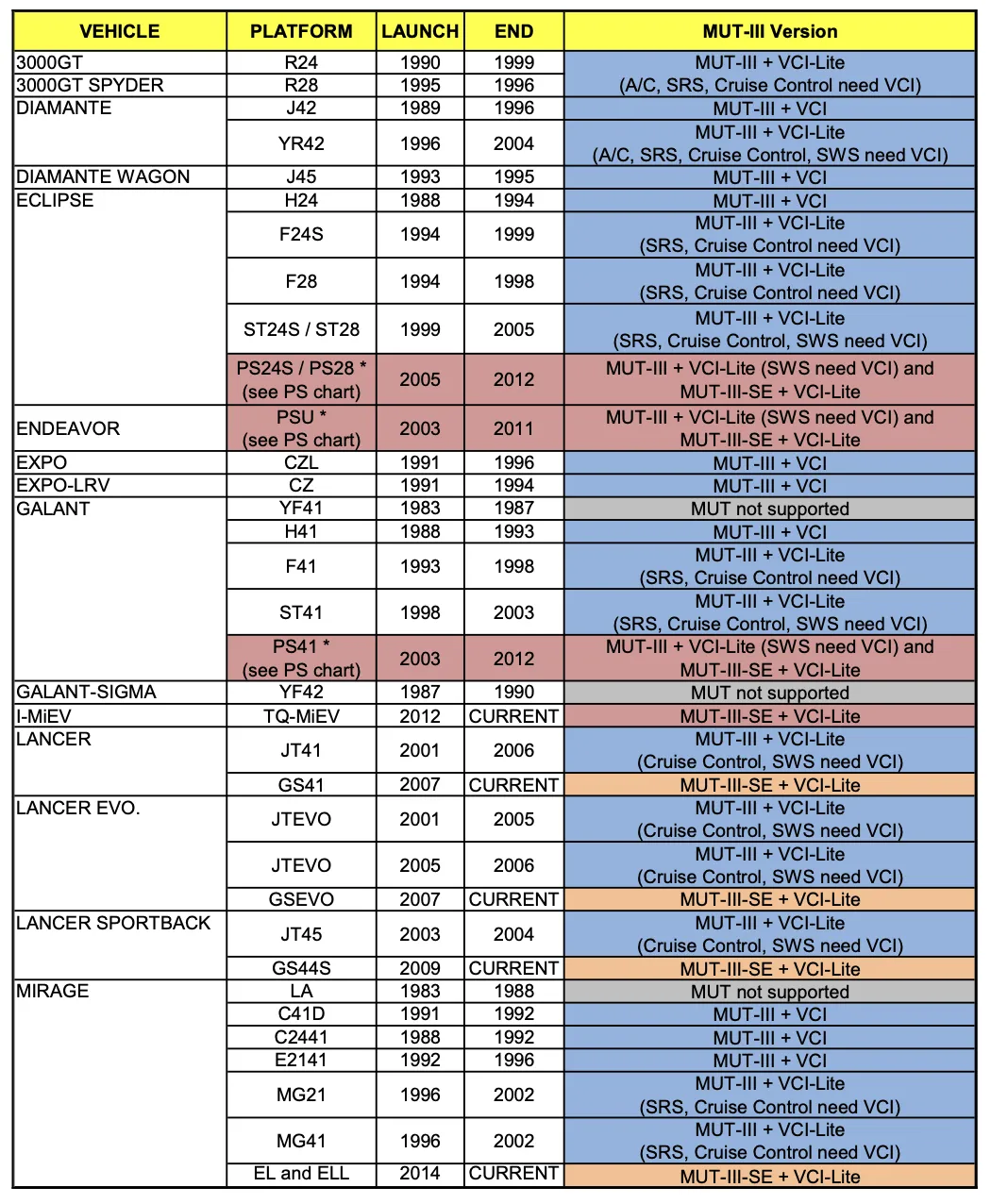
The DCSMV field is hex-encoded. Decoding 454C202020202020:
bytes.fromhex('454C202020202020').decode('ascii')
# Result: 'EL      '
This is a platform identifier. As confirmed by this Service Bulletin , “EL” is one of the platform codes for the Mirage
CANBUS_SPEC
This section defines CAN bus specifications for vehicles
<CANBUS_SPEC>
  <ID DSTN_ID="001">
    <VHCL TYPE="186" KIND="419" MODEL_YR="13">
      <CANBUS_ID>047535814</CANBUS_ID>
      <PASSTHRU>1</PASSTHRU>
    </VHCL>
    <VHCL TYPE="186" KIND="419" MODEL_YR="15">
      <CANBUS_ID>047535814</CANBUS_ID>
      <PASSTHRU>1</PASSTHRU>
    </VHCL>
<!-- Truncated for blog post -->
How CANBUS_SPEC is Loaded
Looking at the decompiled source in System/Common/MUT3_SE/MUT3_SE.decompiled.cs, we can see how CANBUS_SPEC entries are loaded into memory:
CanbusSpecList = (from lstEnum in Extensions.Elements<XElement>(
    Extensions.Elements<XElement>(
        Extensions.Elements<XElement>(
            ((XContainer)xdocVehicleDB).Elements(XName.op_Implicit("Vehicle_DB")),
            XName.op_Implicit("CANBUS_SPEC")),
        XName.op_Implicit("ID")),
    XName.op_Implicit("VHCL"))
    select ModelVehicleDB.CanbusSpec.CreateCanbusSpec(
        (string)((XObject)lstEnum).Parent.Attribute(XName.op_Implicit("DSTN_ID")),
        ToInt((string)lstEnum.Attribute(XName.op_Implicit("TYPE")), 0),
        ToInt((string)lstEnum.Attribute(XName.op_Implicit("KIND")), 0),
        ToInt((string)lstEnum.Attribute(XName.op_Implicit("MODEL_YR")), 0),
        (string)((XContainer)lstEnum).Element(XName.op_Implicit("CANBUS_ID")),
        (string)((XContainer)lstEnum).Element(XName.op_Implicit("VCOMP_ID")),
        ToInt((string)((XContainer)lstEnum).Element(XName.op_Implicit("PASSTHRU")), 0)
    )).ToList()
The key insight here is that all CANBUS_SPEC entries from all DSTN_ID sections are loaded into a single flat list (CanbusSpecList). Each entry stores its DSTN_ID as a property, which is extracted from the parent ID element.
Destination-Aware Search
When looking up a CANBUS_SPEC entry, the software uses a destination-aware search algorithm. From the GetCanBusId() method:
public string GetCanBusId() {
    if (vehicleDb == null) return null;

    // Find all entries matching Type/Kind/ModelYear
    List<ModelVehicleDB.CanbusSpec> list = vehicleDb.CanbusSpecList.FindAll(
        (canbusSpec_0) => canbusSpec_0.Type.ToString(provider) == typeValueBk &&
                          canbusSpec_0.Kind.ToString(provider) == kindValueBk &&
                          canbusSpec_0.ModelYear.ToString(provider) == yearValueBk);

    if (list != null && list.Count >= 1) {
        // If only 1 match exists, return it (regardless of DSTN_ID)
        if (list.Count == 1) {
            return list[0].CanbusId;
        }
        // If multiple matches exist, find the one for the given destination
        foreach (ModelVehicleDB.CanbusSpec item in list) {
            if (dstnIndex >= 0 && item.DstnId == dstnCombo[dstnIndex].Value) {
                return item.CanbusId;
            }
        }
        return null;
    }
    return null;
}
The algorithm:
- Find all entries matching
Type,Kind, andModelYearfrom across all destinations - If exactly one match exists, return it immediately (ignoring destination)
- If multiple matches exist, prefer the entry matching the user’s selected destination
- If no destination-specific match is found, return
null
This explains why many vehicles have their CANBUS_SPEC entries in DSTN_ID="999". This catch-all destination ensures a single match is found when no destination-specific entry exists. For my 2015 Mitsubishi Mirage, the combination of type, kind, and model year only exists in DSTN_ID="999":
<CANBUS_SPEC>
<!-- Truncated for blog post -->
    <ID DSTN_ID="999">
    <!-- Truncated for blog post -->
        <VHCL TYPE="321" KIND="2618" MODEL_YR="15">
            <CANBUS_ID>6454C12</CANBUS_ID>
            <PASSTHRU>1</PASSTHRU>
        </VHCL>
I believe the CANBUS_ID is used for looking up CAN bus system diagrams, but that data resides in the DiagDB which is outside the scope of this blog post.
The following Python function implements this destination-aware search logic:
def canbus_spec(destination: str, vin_info: dict, commonDB_path: str) -> dict:
    """
    Looks up CAN bus specification using destination-aware search
    Args:
        destination: The destination ID (e.g., "002" for NAFTA).
        vin_info: Dictionary with VehicleType, VehicleKind, VehicleYear.
        commonDB_path: Path to the CommonDB directory.
    Algorithm:
        1. Find all CANBUS_SPEC entries matching Type/Kind/ModelYear
        2. If only 1 match exists, return it (regardless of DSTN_ID)
        3. If multiple matches exist, return the one matching the destination argument
    Returns:
        Dictionary with CANBUS_ID and PASSTHRU, or None if not found.
    """
    vehicle_db_file = os.path.join(commonDB_path, "Vehicle_DB.xml")
    tree = ET.parse(vehicle_db_file)

    # Collect all matching entries from all DSTN_ID sections
    matches = []
    for id_elem in tree.find("CANBUS_SPEC").findall("ID"):
        dstn_id = id_elem.get("DSTN_ID")
        for vhcl in id_elem.findall("VHCL"):
            if (
                vhcl.get("TYPE") == vin_info["VehicleType"]
                and vhcl.get("KIND") == vin_info["VehicleKind"]
                and vhcl.get("MODEL_YR") == vin_info["VehicleYear"]
            ):
                matches.append({
                    "DSTN_ID": dstn_id,
                    "CANBUS_ID": vhcl.find("CANBUS_ID").text,
                    "PASSTHRU": vhcl.find("PASSTHRU").text,
                })

    # If only 1 match, return it
    if len(matches) == 1:
        return {"CANBUS_ID": matches[0]["CANBUS_ID"], "PASSTHRU": matches[0]["PASSTHRU"]}
    # If multiple matches, find the one for the given destination
    elif len(matches) > 1:
        for match in matches:
            if match["DSTN_ID"] == destination:
                return {"CANBUS_ID": match["CANBUS_ID"], "PASSTHRU": match["PASSTHRU"]}
Example output
{'CANBUS_ID': '6454C12', 'PASSTHRU': '1'}
CONFIG_ENGINE and CONFIG_TRANSMISSION
These sections provide simple ID-to-name mappings:
<CONFIG_ENGINE>
  <ID ENGINE_ID="---">
    <ENGINE_NM>ALL</ENGINE_NM>
  </ID>
  <ID ENGINE_ID="001">
    <ENGINE_NM>GASOLINE</ENGINE_NM>
  </ID>
<!-- Truncated for blog post -->
<CONFIG_TRANSMISSION>
  <ID TRANSMISSION_ID="---">
    <TRANSMISSION_NM>ALL</TRANSMISSION_NM>
  </ID>
  <ID TRANSMISSION_ID="181">
    <TRANSMISSION_NM>F6AJA (6A/T-FWD)</TRANSMISSION_NM>
  </ID>
  <ID TRANSMISSION_ID="182">
    <TRANSMISSION_NM>W6AJA (6A/T-4WD)</TRANSMISSION_NM>
  </ID>
<!-- Truncated for blog post -->
Skipping the straightforward XML parsing code, here is the decoded data for my personal vehicle:
Engine Name:  3A92 (1.2, D4, MPI, VVT)
Transmission Name:  F1CJB (CVT-2WD)
MST_VHCL (Master Vehicle)
This section maps vehicle IDs to human-readable names, organized by destination. “MST” likely stands for “MASTER”.
<MST_VHCL>
  <ID DSTN_ID="001">
    <VHCL VHCL_ID="-2">
      <VHCL_NM>(Other : 19xx - 2005MY)</VHCL_NM>
    </VHCL>
    <VHCL VHCL_ID="2">
      <VHCL_NM>PAJERO (V8#,V9#)</VHCL_NM>
    </VHCL>
<!-- Truncated for blog post -->
Unlike the previous sections, this is a destination-specific list of model names. Searching for VHCL_ID="11" reveals the different names the Mirage goes by in various markets (cross-referenced with DEST_DB.xml):
| Destination | Region | Vehicle Name |
|---|---|---|
| 001 | Japan | MIRAGE |
| 002 | NAFTA | MIRAGE |
| 003 | Europe | SPACE STAR |
| 004 | Export | MIRAGE / SPACE STAR (A0#) |
| 008 | Australia | MIRAGE (A0#) |
MST_DSTN (Master Destination)
This section maps destination IDs to abbreviated names
<MST_DSTN>
  <ID DSTN_ID="001">
    <DSTN_NM>JAPAN</DSTN_NM>
  </ID>
  <ID DSTN_ID="002">
    <DSTN_NM>MMNA</DSTN_NM>
  </ID>
  <ID DSTN_ID="003">
    <DSTN_NM>EUR</DSTN_NM>
  </ID>
  <ID DSTN_ID="004">
    <DSTN_NM>EXP</DSTN_NM>
  </ID>
  <ID DSTN_ID="008">
    <DSTN_NM>MMAL</DSTN_NM>
  </ID>
</MST_DSTN>
This is slightly different from DEST_DB.xml. For example, destination 008 is “MMAL” (Mitsubishi Motors Australia Limited) here, but “AUSTRALIA” in DEST_DB.xml. This data point makes the CommonDB self-contained.
MST_MAKER
This section is straightforward—it is always Mitsubishi:
<MST_MAKER>
  <ID MAKER_ID="1">
    <MAKER_NM>MITSUBISHI</MAKER_NM>
  </ID>
</MST_MAKER>
Final Result
Combining all the lookup functions, here is the complete vehicle data for VIN ML32A3HJ1FH050391 (using destination 002 for NAFTA):
VIN information:
{
  'VehicleKind': '2618',
  'VehicleType': '321',
  'VehicleYear': '15'
}
vehicle configuration:
{
  'DCSMV': b'EL      ',
  'ENGINE_ID': 'R25',
  'MAKER_ID': '1',
  'TRANSMISSION_ID': 'B12',
  'VEHICLE_FAMILY': '-',
  'VHCL_ID': '11',
  'VHCL_VIEW': '0'
 }
canbus specification:
{
  'CANBUS_ID': '6454C12',
  'PASSTHRU': '1'
}
engine name: 3A92 (1.2, D4, MPI, VVT)
transmission name: F1CJB (CVT-2WD)
model name: MIRAGE
destination name: MMNA
maker name: MITSUBISHI
Observations
- VHCL_VIEW is
0for all vehicles except one which has a value of2. That vehicle only exists inVehicle_DB.xmland not in VIN_Search—it may be for testing purposes. - VEHICLE_FAMILY is set for newer vehicles (2022 onward) with values like
P022,P012,P040. Older vehicles use-as a placeholder. - CANBUS_ID likely references CAN bus system diagrams in the DiagDB, which we will explore in a future post.
Conclusion
In this part of the MUT-III SE reverse engineering series, we explored the CommonDB and learned how the software maps VINs to vehicle specifications:
- VIN_Selection.xml provides a quick index to locate the correct VIN_Search file
- VIN_Search_XXX.xml files map individual VINs to Type, Kind, and Model Year
- Vehicle_DB.xml contains detailed vehicle configurations organized by destination
- Destinations represent regional markets and affect available configurations
The complete Python code for all the lookups demonstrated in this post is available on GitHub: GitHub repository
In the next part of this series, we will implement a web-based viewer of CommonDB data and calculate aggregate analytics of the available data.